This is the sample configuration of haproxy as load balancer and keepalived to make load balancer high available
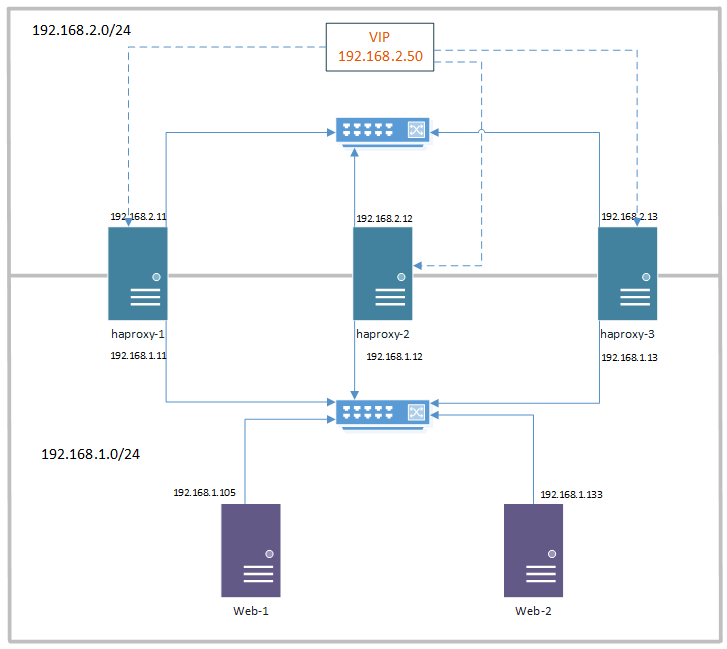
Step 1
first of all keepalived configuration on master, change desired value on backup server:
/etc/keepalived/keepalived.conf
vrrp_instance VI_3 {
    interface eth0 #change this according to each node
    state MASTER # chnage to BACKUP on backup node
    priority 200 #change this to elect master, higher will elect as master
    virtual_router_id 33
    unicast_src_ip 192.168.2.13 #change this for each node

    unicast_peer {
        192.168.2.12
        192.168.2.11
    }

    authentication {
        auth_type PASS
        auth_pass passwd #change it
    }
	virtual_ipaddress {
		192.168.2.50 #virtual IP, change it
	}
}
Step 2
This is haporxy configuration
/etc/haproxy/haproxy.cfg
defaults
        log     global
        mode    tcp
        option  tcplog
....
frontend www
        bind 192.168.2.50:80
        default_backend nginx_pool

backend nginx_pool
        balance roundrobin
        mode tcp
        server web1 192.168.1.105:80 check
        server web2 192.168.1.133:80 check
Step 3
Considerations:
- add “Allowed Address Pair” in Openstack under: etwork/networks/name/ports/port_name which is equal to virtual ip address
- enble ip forwarding and nonlocal bind in /etc/sysctl.conf:
net.ipv4.ip_forward=1
net.ipv4.ip_nonlocal_bind=1 - reload sysctl:
sysctl -p /etc/sysctl.conf
- setup firewall rules if necessary
- keepalived vrrp connect on UDP/112 make sure is enabled