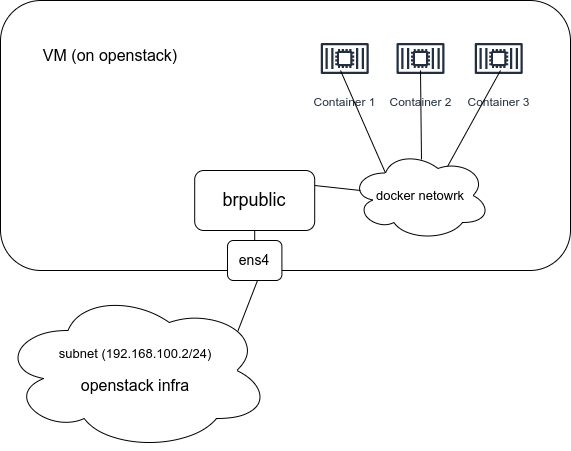
- Ensure VM port security is disable in openstack to allow has multiple IP/MAC combination
- Create a bridge in linux
- Add physical interface to the bridge
4network:
    version: 2
    ethernets:
        ens3:
            dhcp4: true
            match:
                macaddress: fa:16:3e:ac:44:10
            mtu: 1500
            set-name: ens3
        ens4:
            dhcp4: true
            match:
                macaddress: fa:16:3e:5f:05:5f
            mtu: 1450
    bridges:
        brpublic:
            interfaces: [ens4]
            dhcp4: true
4. Ensure physical ip address is flushed if not, flush it manually
# ip -c a
output should be like this:
...

3: ens4: <BROADCAST,MULTICAST,UP,LOWER_UP> mtu 1450 qdisc fq_codel master brpublic state UP group default qlen 1000
    link/ether fa:16:3e:5f:05:5f brd ff:ff:ff:ff:ff:ff
...

90: brpublic: <BROADCAST,MULTICAST,UP,LOWER_UP> mtu 1450 qdisc noqueue state UP group default qlen 1000
    link/ether fa:16:3e:5f:05:5f brd ff:ff:ff:ff:ff:ff
    inet 192.168.100.93/24 brd 192.168.100.255 scope global dynamic brpublic
       valid_lft 85349sec preferred_lft 85349sec
    inet6 fe80::3c4f:19ff:fe34:e54b/64 scope link
       valid_lft forever preferred_lft forever
5. Create openstack network to use bridge (which handle container connectivity)
6. Take care of MTU in infrastructure (openstack), in this case set the max mtu in docker daemon json file
docker network create --driver bridge --subnet=192.168.100.0/24 \
--gateway=192.168.100.10  --ip-range=192.168.100.150/26 \
-o com.docker.network.bridge.name=brpublic \
-o com.docker.network.driver.mtu=1450 openstack
- be careful to use subnet id in –iprange
- use bridge interface IP address in –gateway
7. Check routing table for the desired subnet to be correct
ip route list
8. Sample docker-compose.yml
version: '3'

services:
  master:
    image: locustio/locust
    volumes:
      - ./:/mnt/locust
    command: -f /mnt/locust/locust.py --master --web-host=0.0.0.0
    network_mode: "host"
  worker:
    image: locustio/locust
    volumes:
      - ./:/mnt/locust
    command: -f /mnt/locust/locust.py --worker --master-host  192.168.100.10
    networks:
      - public
    deploy:
      replicas: 16

networks:
  public:
    name: openstack
    external: true